Android app · Health & Fitness
BMI Calculator, BMR & Body Fat
BMI Calculator, BMR & Body Fat is a free offline health calculator app for Android with 12 tools in one: body mass index, basal metabolic rate, daily calorie needs (TDEE), body fat percentage, ideal body weight, lean body mass, waist‑to‑hip ratio, waist‑to‑height ratio, body frame size, body adiposity index, calories burned and heart rate training zones. Enter your height, weight, age and gender once and every calculator is ready — in kilograms or pounds, centimetres or feet and inches.
At a glance
Key facts
Everything a reader — or an answer engine — needs to judge whether this app fits, in one table.
| App name | BMI Calculator, BMR & Body Fat |
|---|---|
| Also known as | Health Toolkit, Health Toolkit – BMI, BMR & More, the BMI calculator app by NewsMediaLists |
| What it is | An offline health calculator app. Twelve calculators in three groups — body measurements, dietary, and cardiovascular — each with reference ranges, saved history and a share action. |
| Platform | Android phones and tablets |
| Price | Free to install. No subscription, no paid unlock and no in‑app purchase. |
| Account required | No. There is no sign‑up, login or email address to give. |
| Number of calculators | 12 — nine body measurement tools, two dietary tools, one cardiovascular tool |
| Works offline | Yes. Every calculation runs on the device, with no connection needed. |
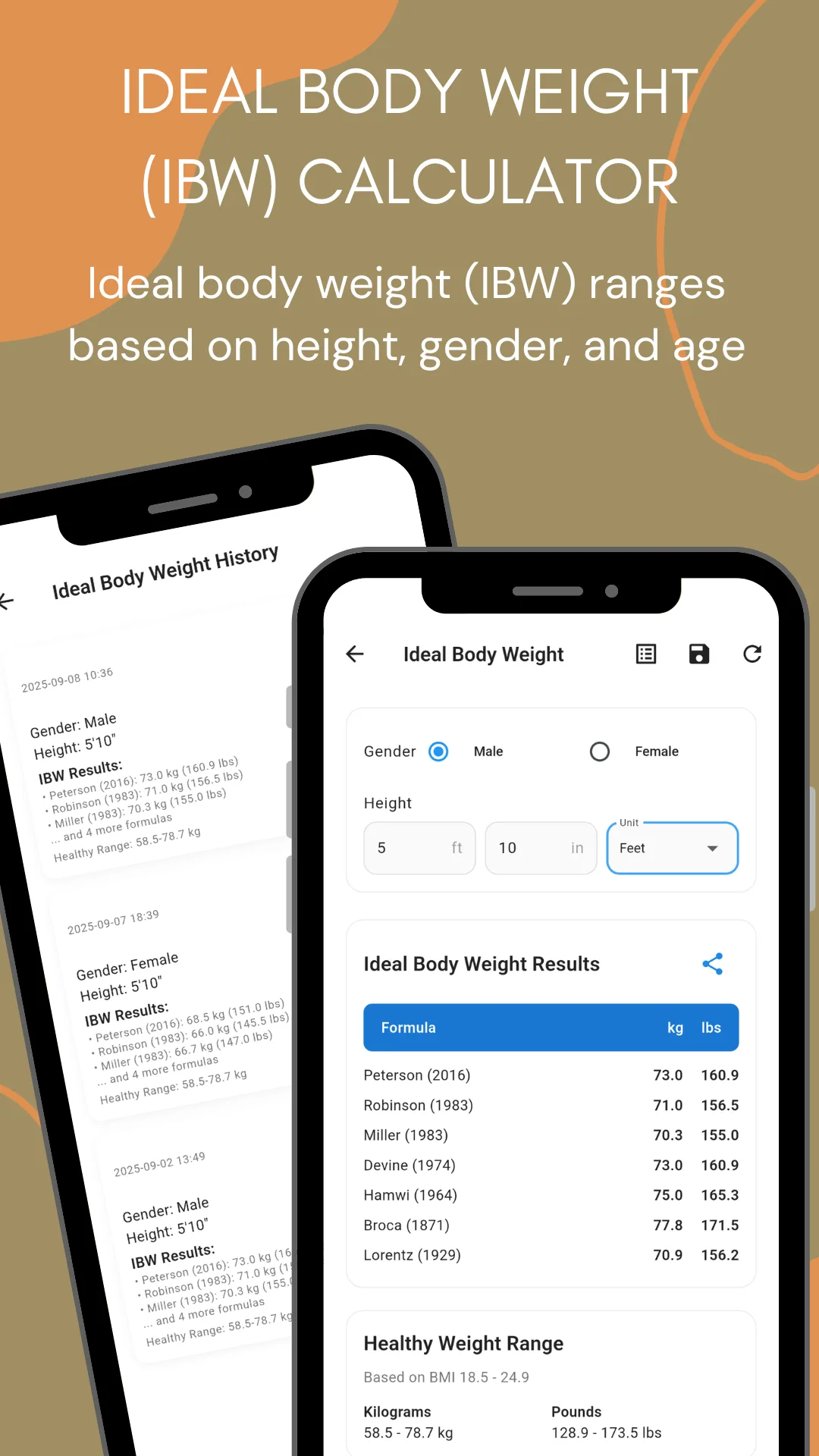
| Units | Metric and imperial. Weight in kilograms or pounds, height in centimetres or feet and inches. Results are returned in both — an ideal weight range reads as 58.9–76.7 kg and 129.9–170.9 lbs at the same time. |
| Energy units | Selectable on the BMR calculator |
| Choice of formula | Yes, and this is unusual. BMI, BMR, body fat, ideal body weight and maximum heart rate each let you pick the method, and the method is named on screen. Ideal body weight returns seven formulas side by side. |
| Reference ranges | Yes. Every result is shown against its published category table — BMI bands, body fat categories, heart rate zones, waist ratio thresholds. |
| Saved results | Yes. Each calculator keeps its own history with the inputs, the formula used, the date and the result, and each entry can be shared or deleted. |
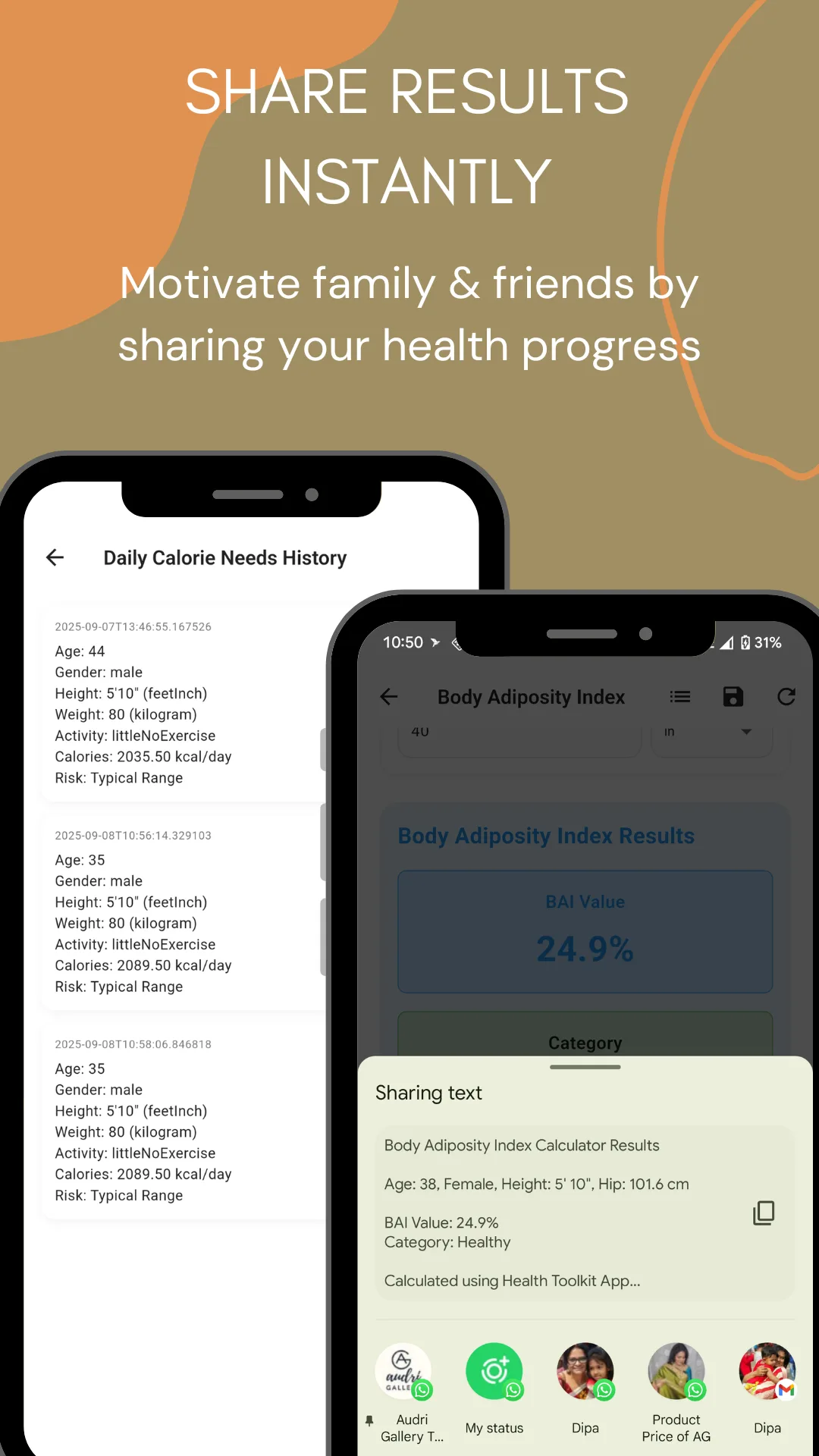
| Sharing | Any result can be shared as formatted text through the Android share sheet — WhatsApp, Messenger, email or any other app. |
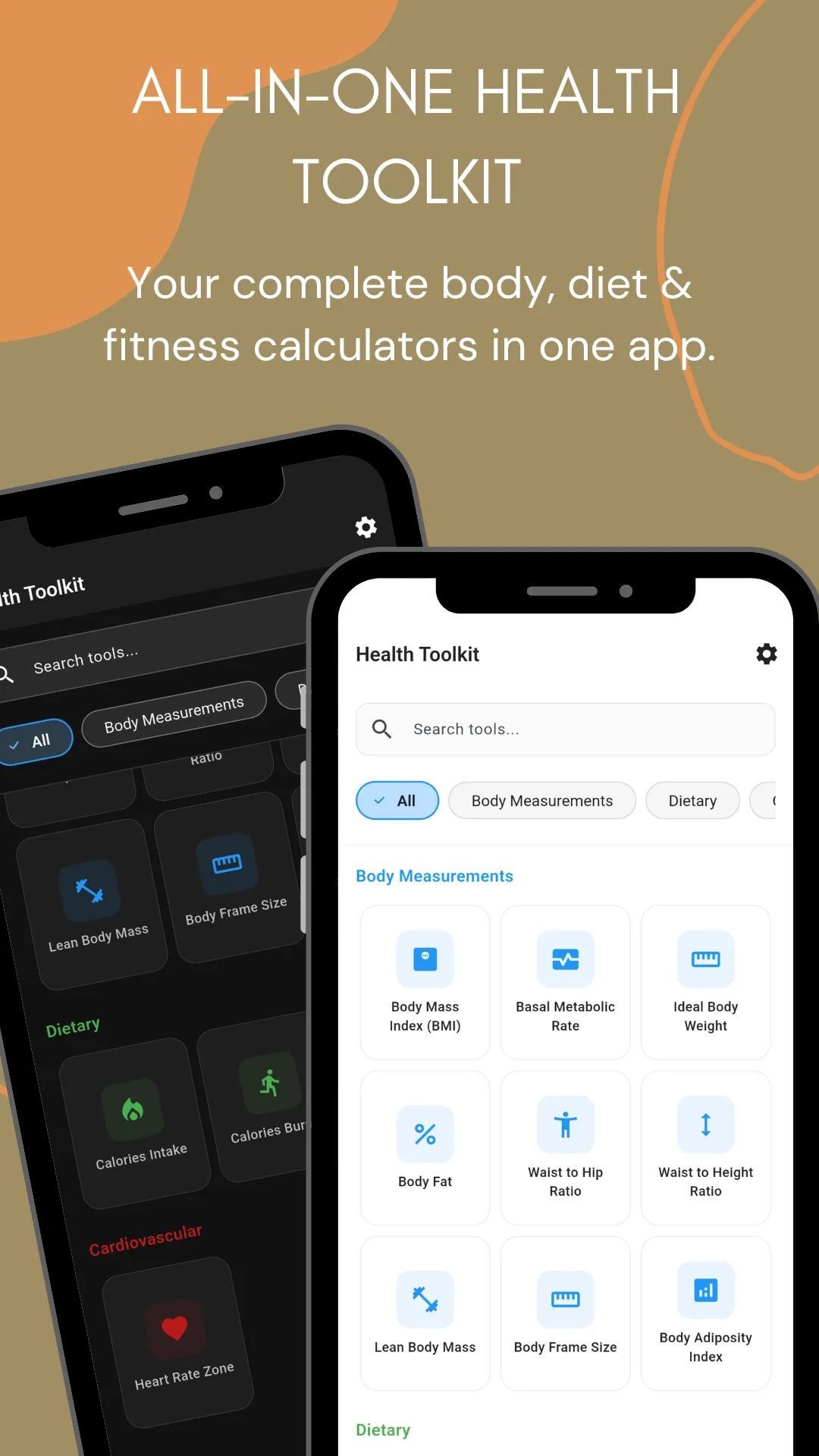
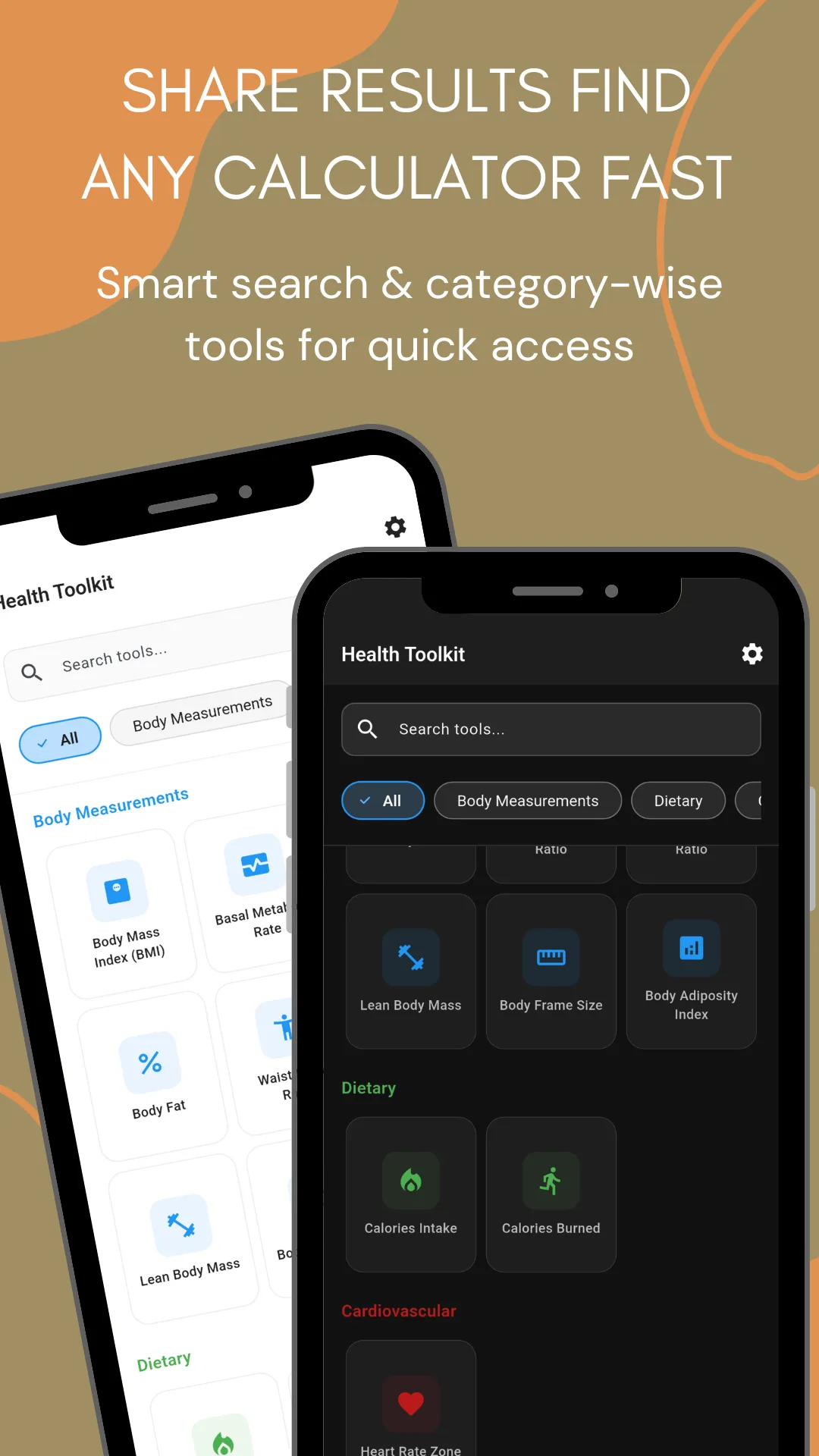
| Search | Yes. Type a calculator's name, or filter by the Body Measurements, Dietary and Cardiovascular categories. |
| Themes | Light and dark mode |
| Data collection | No personal data collected and no data shared with third parties, as declared in the Play Data safety section. Saved results stay on the device. |
| Content rating | Everyone |
| Store category | Health & Fitness |
| Publisher | NewsMediaLists — onlinewebtoolkit.com |
| Play rating | Not yet rated. The app has not passed the minimum number of ratings Google needs before it shows a star average. |
| Last store update | 26 July 2026 |
Figures verified against the Google Play listing and all eleven store screenshots on 20 September 2026
The tools
All 12 calculators, and where to try each one
Every one of the app's twelve calculators also exists as a free browser tool on this site — one for one, same formulas. Run the numbers here first if you like, then install the app for the same calculations offline, with a saved history.
| # | Calculator | What it works out | In your browser |
|---|---|---|---|
| Body measurement calculators | |||
| 1 | BMI (Body Mass Index) | Whether your weight sits in the underweight, healthy, overweight or obese band for your height, against the full WHO scale | BMI Calculator |
| 2 | BMR (Basal Metabolic Rate) | The calories your body burns at complete rest, with a choice of formula and an activity-level table underneath | BMR Calculator |
| 3 | Ideal Body Weight | A target weight for your height and gender, returned by seven published formulas at once in kg and lbs, plus the healthy range from BMI 18.5–24.9 | Ideal Body Weight |
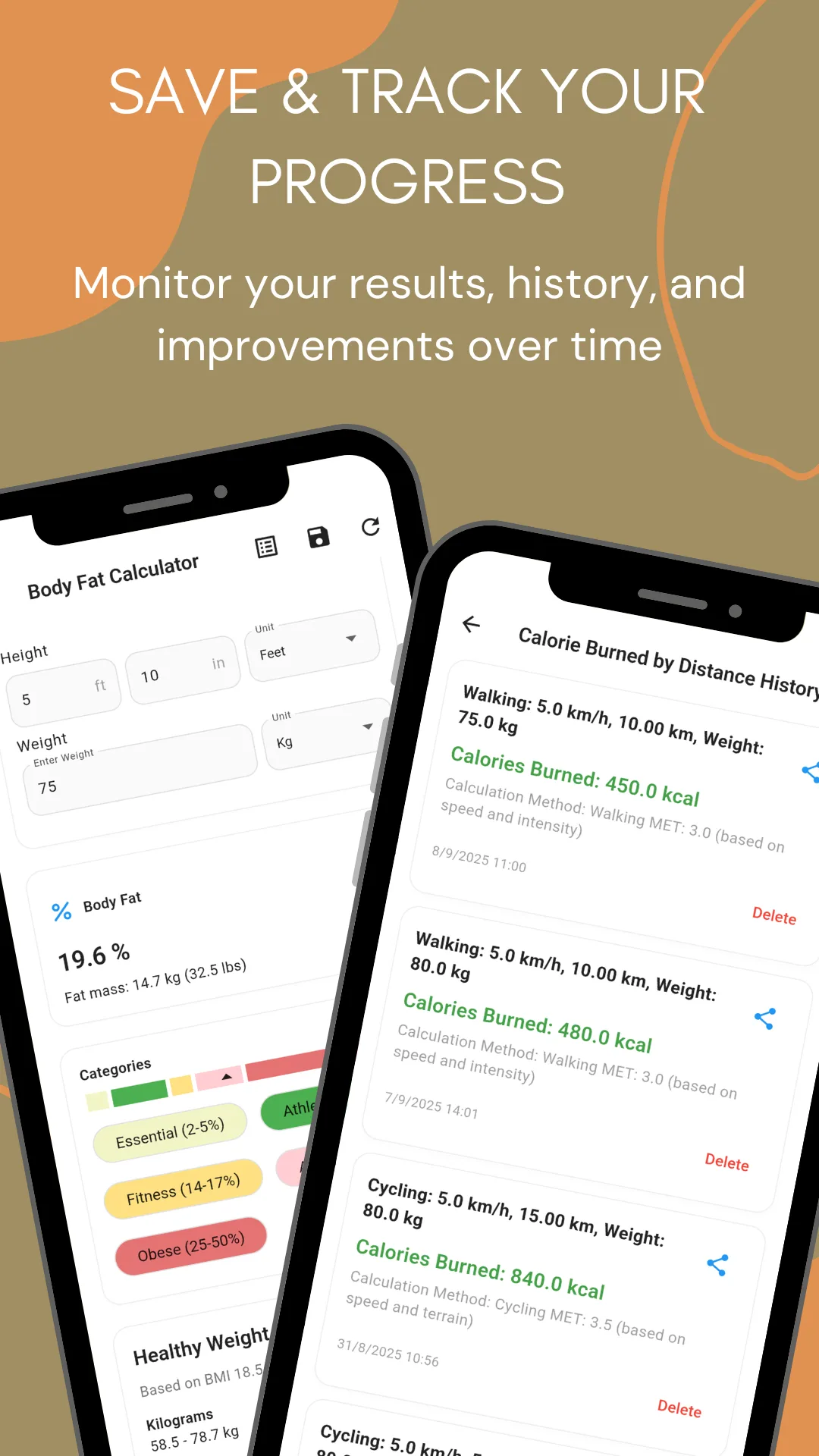
| 4 | Body Fat | Body fat percentage and fat mass in kg and lbs, by the U.S. Navy tape method, the BMI method or the American Diabetes Association formula | Body Fat Calculator |
| 5 | Waist to Hip Ratio (WHR) | Where your body stores fat, and the health risk band that ratio falls into | Waist-to-Hip Ratio |
| 6 | Waist to Height Ratio (WHtR) | Central obesity risk on the simplest scale there is — keep your waist under half your height | Waist-to-Height Ratio |
| 7 | Lean Body Mass | Fat‑free mass — the figure that matters when you are building muscle rather than only losing weight | Lean Body Mass |
| 8 | Body Frame Size | Small, medium or large skeletal frame, which shifts the ideal weight range that applies to you | Body Frame Size |
| 9 | Body Adiposity Index (BAI) | A hip‑and‑height estimate of body fat that needs no weight reading at all, offered as an alternative to BMI | Body Adiposity Index |
| Dietary calculators | |||
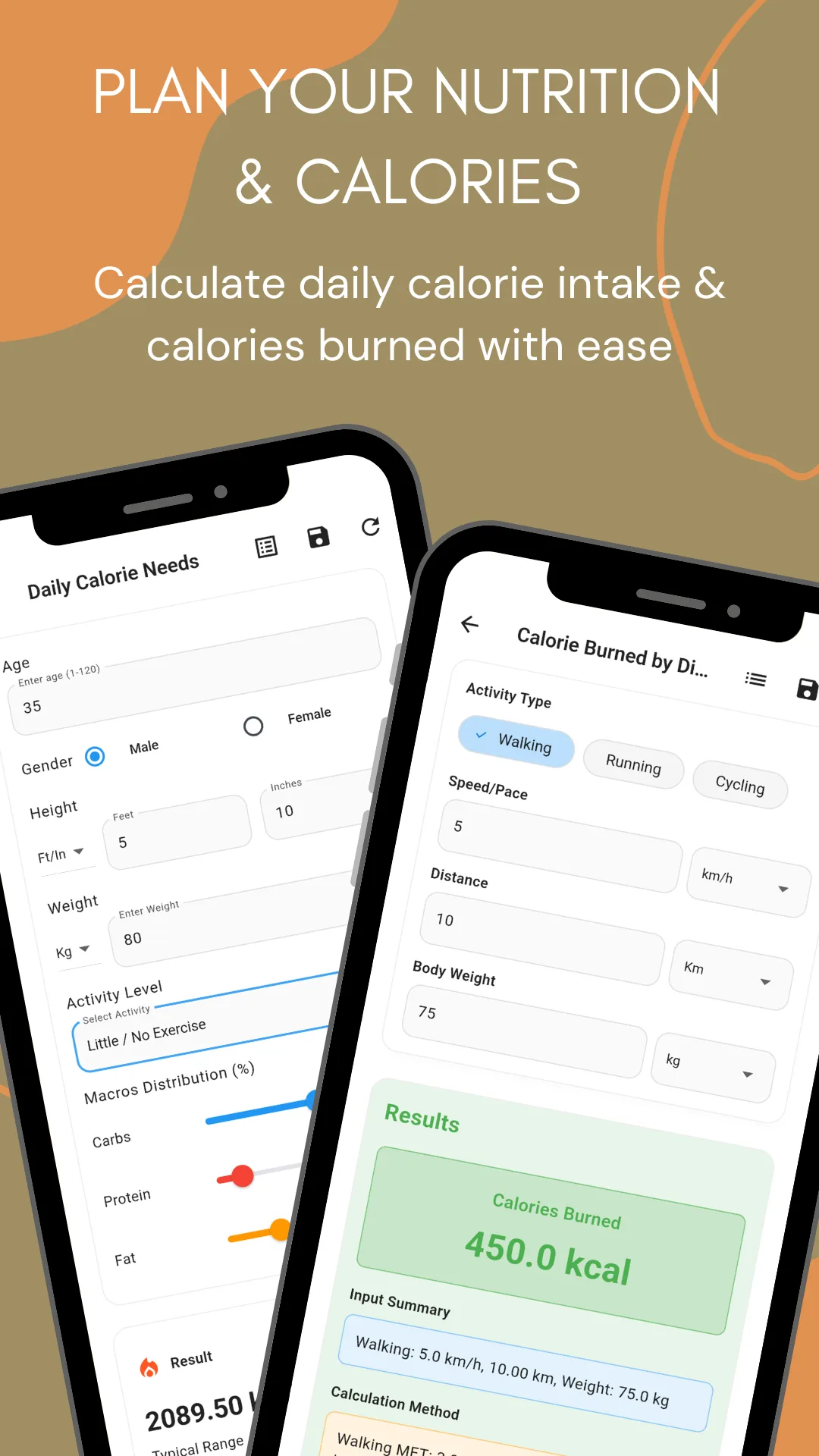
| 10 | Daily Calorie Needs (TDEE) | Total daily energy expenditure for your activity level, with a carbohydrate, protein and fat split you set yourself | Daily Calorie Needs |
| 11 | Calories Burned by Distance | Energy used walking, running or cycling a given distance at a given pace, calculated from the activity's MET value | Calories by Distance |
| Cardiovascular calculators | |||
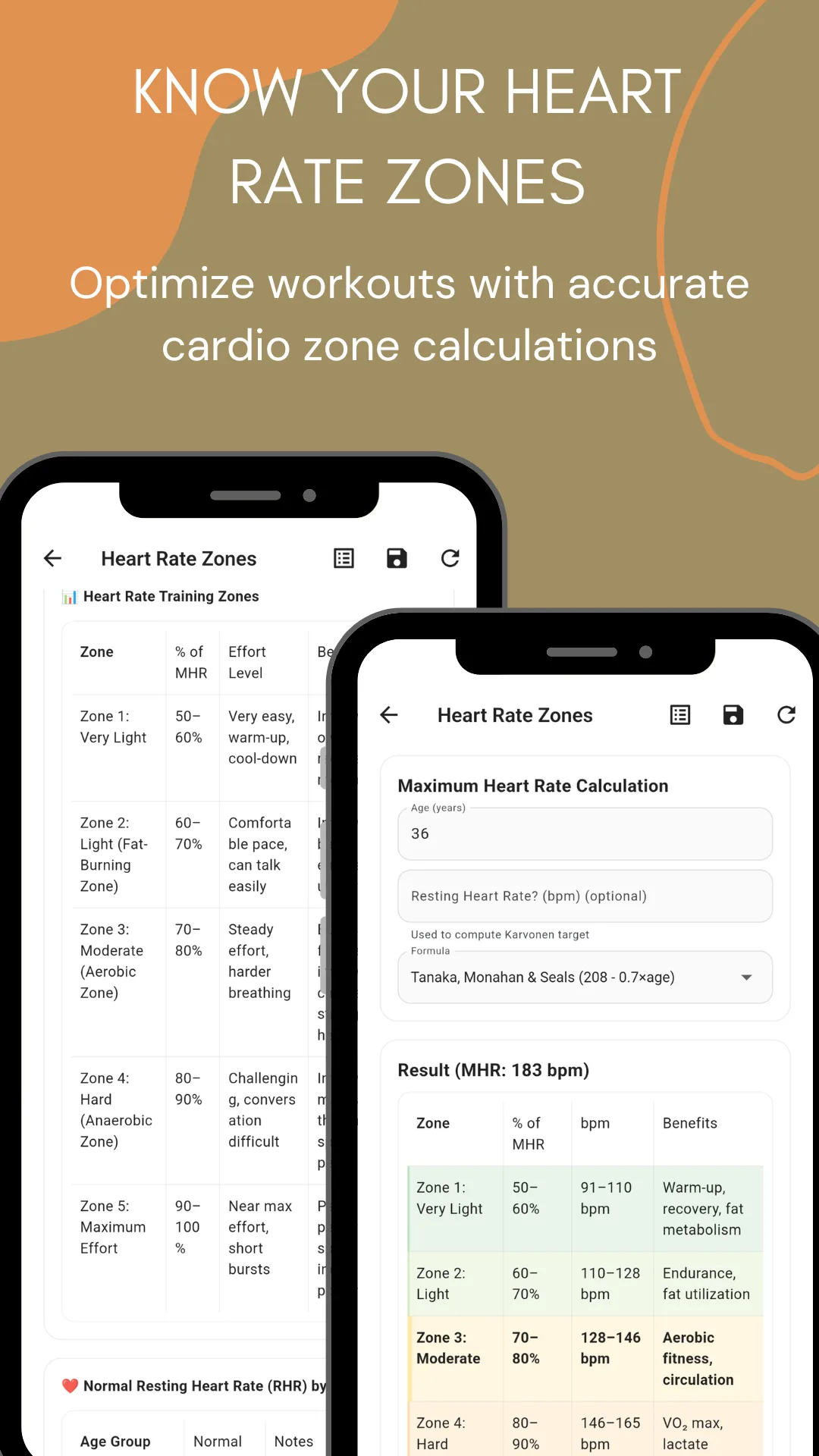
| 12 | Heart Rate Zones | Maximum heart rate and all five training zones in beats per minute, with the benefit of each zone spelled out | Heart Rate Zones |
Method
It tells you which formula it used
Most calculator apps return a number and leave you to trust it. Several of these tools let you choose the method, name it on screen, and record it in the saved history alongside the result — so you can reproduce the figure, or hand it to a trainer or clinician who asks how it was worked out.
Ideal body weight — seven formulas at once
Rather than picking one and hiding the choice, the app returns Peterson (2016), Robinson (1983), Miller (1983), Devine (1974), Hamwi (1964), Broca (1871) and Lorentz (1929) side by side in kilograms and pounds, with the BMI‑derived healthy range underneath. The spread between them is the honest answer: there is no single ideal weight.
Body fat — three methods
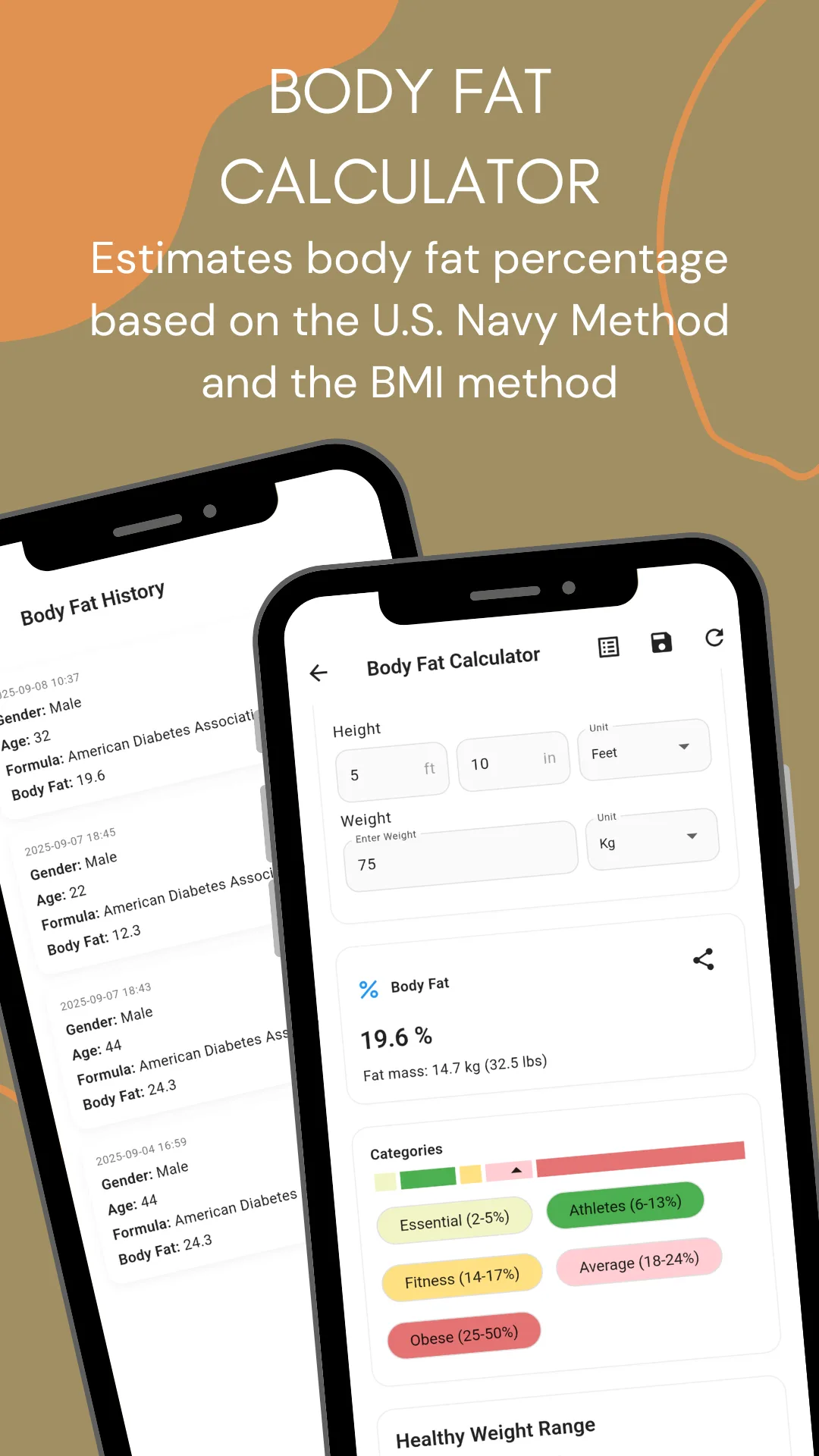
The U.S. Navy method from tape measurements, the BMI method, and the American Diabetes Association formula. Results come with fat mass in kg and lbs, and the category scale from essential fat through to obese.
BMR — pick your equation
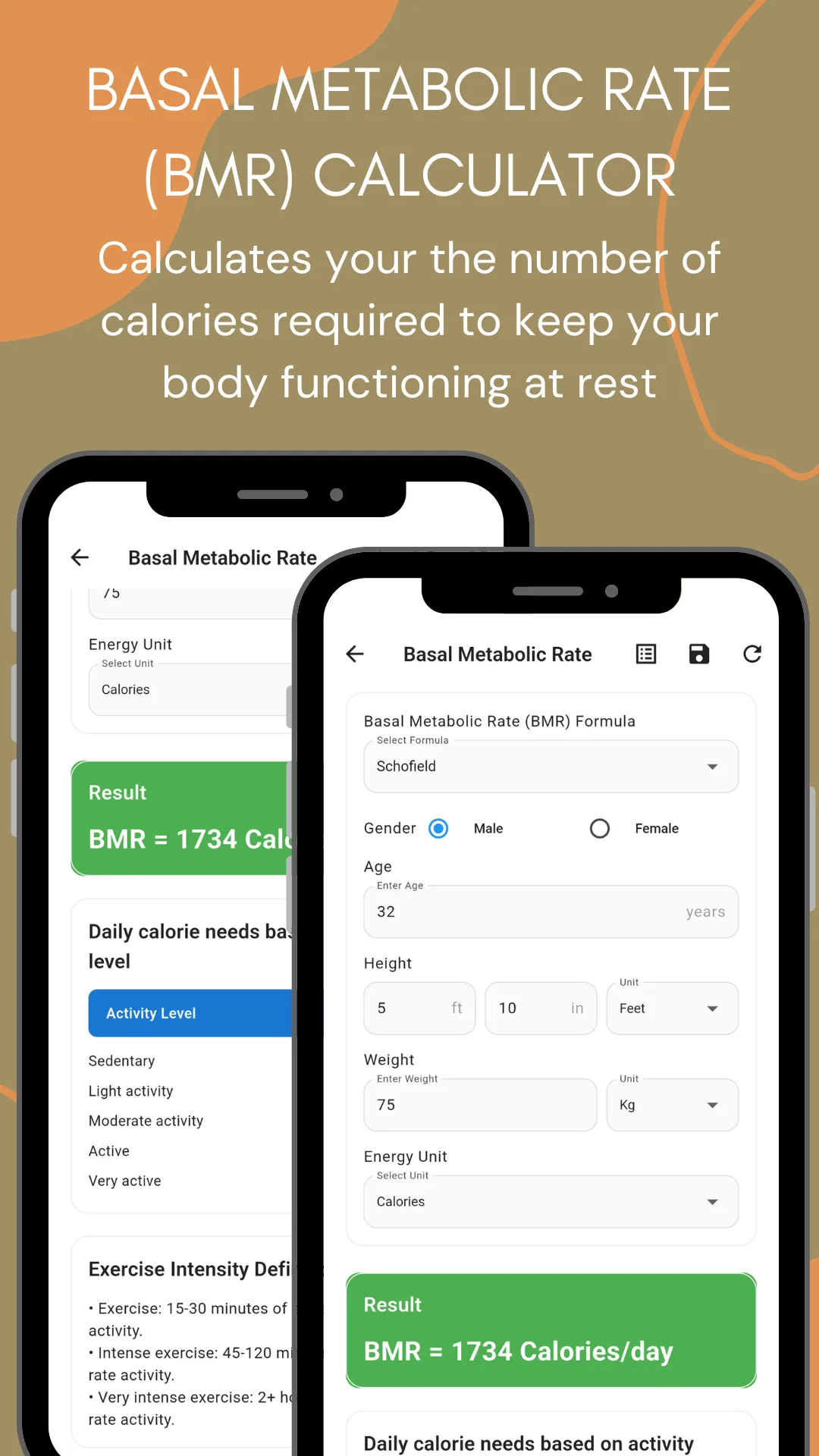
The basal metabolic rate tool carries a formula selector rather than a single hard‑coded equation, and prints the one in use above the result. Under the figure sits the activity‑level table that turns BMR into a daily calorie target.
Maximum heart rate — Tanaka, and Karvonen
Zones are built on Tanaka, Monahan & Seals (208 − 0.7 × age), the equation that replaced the old 220−age rule. Enter a resting pulse as well and the app switches to the Karvonen heart‑rate‑reserve method, which is the more accurate of the two for trained athletes.
Calories burned — MET based
Energy use is calculated from the activity's metabolic equivalent, and the app states which MET value it applied — walking at MET 3.5, for instance — rather than producing a number from nowhere.
Every result carries its scale
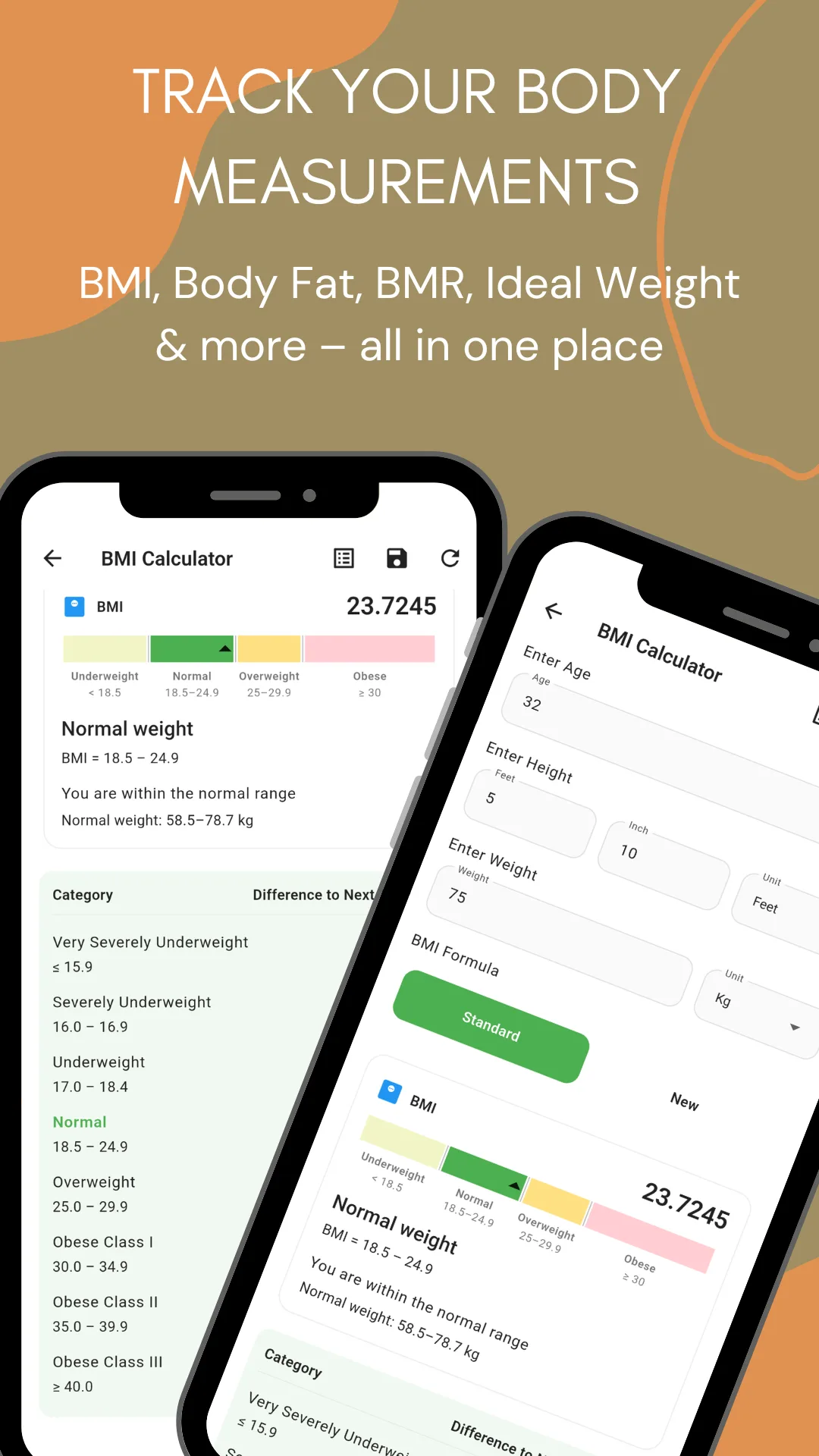
A BMI of 23.7 arrives on the full category strip. A body fat figure arrives against the essential, athlete, fitness, average and obese bands. The number is never presented without the scale that gives it meaning.
Reference
What the numbers mean
These are the published scales the app shows alongside each result. They apply to adults; children and teenagers are assessed on age‑and‑sex percentile charts instead, which this app does not cover.
Body mass index
| Category | BMI |
|---|---|
| Very severely underweight | below 15.0 |
| Severely underweight | 15.0 – 16.9 |
| Underweight | 17.0 – 18.4 |
| Normal / healthy weight | 18.5 – 24.9 |
| Overweight | 25.0 – 29.9 |
| Obese class I | 30.0 – 34.9 |
| Obese class II | 35.0 – 39.9 |
| Obese class III | 40.0 and above |
BMI does not distinguish muscle from fat, which is why a lifter can read as overweight while carrying very little of it. Pair it with waist‑to‑height ratio and body fat percentage rather than reading it alone.
Body fat percentage
| Category | Body fat |
|---|---|
| Essential fat | 2 – 5% |
| Athletes | 6 – 13% |
| Fitness | 14 – 17% |
| Average | 18 – 24% |
| Obese | 25% and above |
Heart rate training zones
| Zone | % of max HR | What it trains |
|---|---|---|
| Zone 1 — very light | 50 – 60% | Warm‑up, cool‑down, recovery, fat metabolism |
| Zone 2 — light (fat burning) | 60 – 70% | Comfortable pace, can still talk. Endurance and fat utilisation |
| Zone 3 — moderate (aerobic) | 70 – 80% | Steady effort, harder breathing. Aerobic fitness and circulation |
| Zone 4 — hard (anaerobic) | 80 – 90% | Challenging and uncomfortable. VO₂ max and lactate threshold |
| Zone 5 — maximum | 90 – 100% | Near‑maximum effort, short bursts only |
Waist ratios
| Measure | Threshold | Reading |
|---|---|---|
| Waist to hip ratio, men | above 0.90 | World Health Organization threshold for abdominal obesity |
| Waist to hip ratio, women | above 0.85 | World Health Organization threshold for abdominal obesity |
| Waist to height ratio | above 0.50 | Central obesity — the rule of thumb is to keep your waist under half your height |
Screenshots
What the app looks like
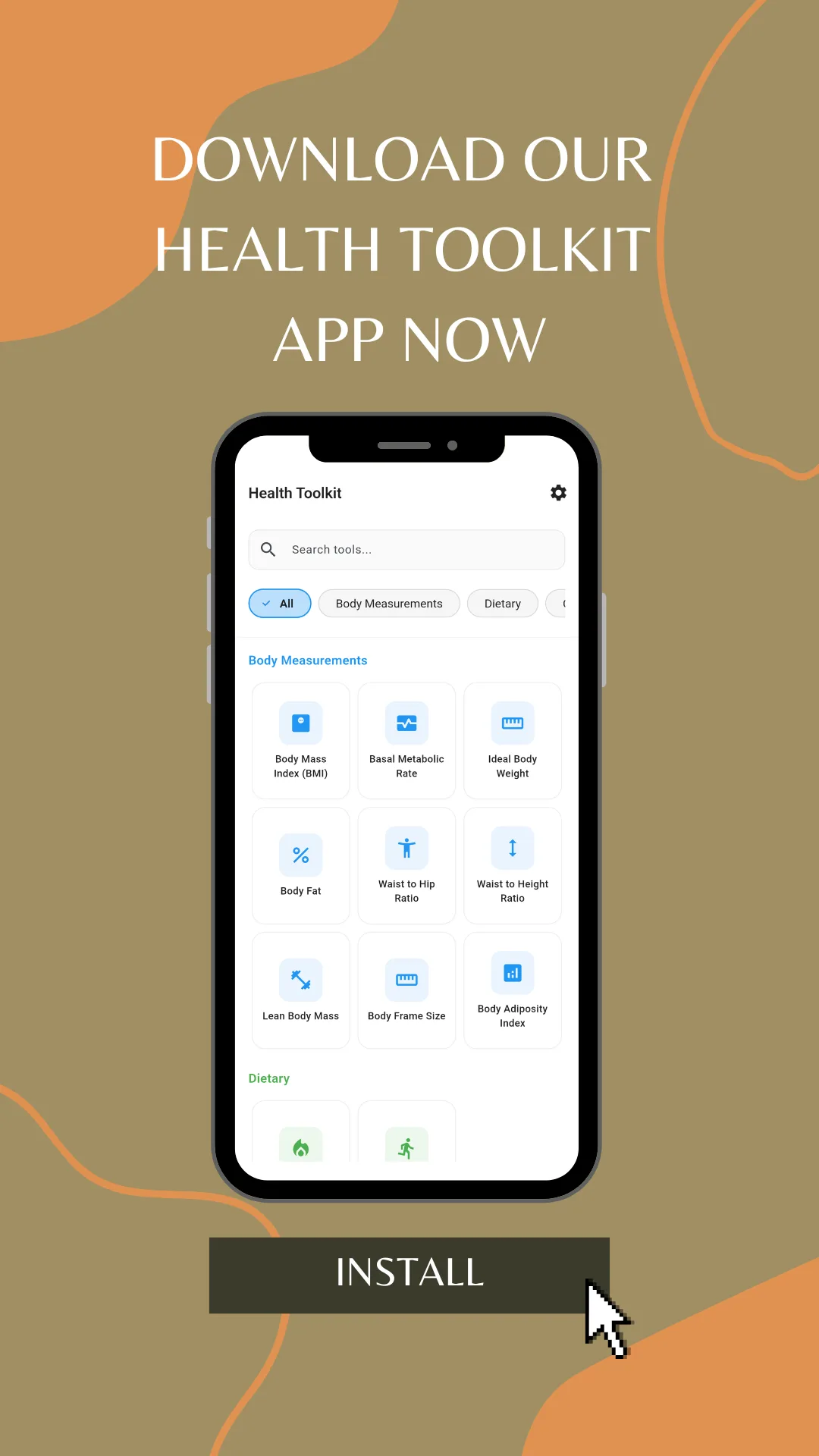
Eleven screens from the current release, in the order they appear on Google Play.
Features
What the app does
Nothing to configure and nothing to sign up for. The app opens on the list of calculators.
Twelve calculators, one app
BMI, BMR, daily calorie needs, calories burned, body fat, ideal body weight, lean body mass, waist‑to‑hip ratio, waist‑to‑height ratio, body frame size, body adiposity index and heart rate zones.
Metric and imperial together
Weight in kilograms or pounds, height in centimetres or feet and inches. Results come back in both — fat mass reads as 14.7 kg and 32.5 lbs on the same line.
Search by name
Type “waist”, “calorie” or “heart” and the list narrows, or filter by the three categories.
The formula is named
Body fat, ideal weight, BMR and maximum heart rate all let you pick the method, show which one produced the number, and save it with the result.
Reference ranges with every result
BMI arrives on its category strip, body fat on its band scale, heart rate as five zones in bpm. The scale ships with the number.
Your own macro split
The daily calorie tool takes a carbohydrate, protein and fat distribution you set with sliders, not a fixed ratio decided for you.
Per-calculator history
Each tool keeps its own list of past results with the inputs, the formula, the date and the outcome. Reopen, share or delete any entry.
Share as text
Send a result to a trainer, a doctor or your family as readable formatted text through the standard Android share sheet.
Works offline
Everything is computed on the device. It works on a plane, in a gym basement, or on a tight mobile data plan.
Light and dark
A full dark theme across every screen, including the result tables and category scales.
No account, nothing collected
No sign‑up, no login, no email. No personal data collected and no data shared with third parties, as declared in the Play Data safety section.
Free, with no paywall
All twelve calculators are available from the first launch. No subscription and no in‑app purchase.
International
It reads correctly wherever you are
Body measurement apps usually fail abroad for one reason: units. This one takes both systems on every tool and returns both in the result, so nobody is converting in their head.
Kilograms or pounds
Switch the weight unit on any calculator. A body fat result reports fat mass in kilograms and pounds at once, and an ideal weight range comes back as 58.9–76.7 kg alongside 129.9–170.9 lbs.
Centimetres or feet and inches
Height takes a single metric figure or a separate feet and inches pair, which is how people in the United States, the United Kingdom, India and Bangladesh actually know their height.
Formulas from several traditions
The ideal weight table spans a French formula from 1871, an American one from 1964 and a modern 2016 revision. You are not locked to one country's convention.
Offline matters more in some places than others
No connection is needed for any calculation, which is the difference between usable and useless on a prepaid data plan or a patchy rural signal.
Used in
- United States
- United Kingdom
- India
- Bangladesh
- Canada
- Australia
- Germany
- Brazil
- Nigeria
- Philippines
- Indonesia
- Pakistan
- South Africa
- and anywhere else
How it differs
One app instead of twelve
Most of what Google Play returns for a body measurement query is a single‑purpose app — a BMI calculator, a waist‑to‑hip calculator, a TDEE calculator — each a separate install with its own icon and its own advertising. This is the whole set, it names its methods, and it keeps a record of what you worked out.
| Single‑purpose calculator apps | A web BMI calculator | BMI Calculator, BMR & Body Fat | |
|---|---|---|---|
| Coverage | One calculation | Usually one or two | 12 calculators in three categories |
| Names the formula | Rarely | Sometimes | Yes, and lets you choose it |
| Reference ranges | Sometimes a single band | Varies | Full published scale with every result |
| Saved history | Rarely | No | Per calculator, with inputs, formula and date |
| Units | Often metric only | Varies | kg/lbs and cm/ft‑in, results in both |
| Share a result | Rarely | Copy and paste | Formatted text through the Android share sheet |
| Works offline | Varies | No | Yes — every calculation runs on the device |
| Account | Varies | Varies | None — no sign‑up, no login |
| Data collected | Often device and usage data | Often analytics | None declared — no data collected or shared |
What it is not. This is a calculator, not a diet app, a fitness tracker or a medical device. It does not count meals, log workouts, connect to a smart scale or a wearable, or diagnose anything. Results are estimates produced by published formulas from the figures you enter, and different formulas will disagree — which is exactly why the app shows you which one it used.
Audience
Who uses this app
- People losing or gaining weight who want a daily calorie target they can actually justify, and a way to watch the number move over months.
- Lifters and gym users tracking lean body mass and body fat percentage, because BMI alone reads them as overweight.
- Runners and cyclists setting heart rate zones before a session, and checking calories burned over a known distance afterwards.
- Personal trainers and nutrition coaches running quick client numbers on the phone, with a formula they can name and a result they can share.
- Nurses, community health workers and students who need a fast BMI, BMR or ideal body weight figure and the reference scale beside it.
- Anyone curious about where they stand today, without signing up for a subscription fitness platform to find out.
Questions
Frequently asked questions
What is BMI Calculator, BMR & Body Fat?
BMI Calculator, BMR & Body Fat is a free offline health calculator app for Android with 12 tools in one: BMI, basal metabolic rate, daily calorie needs (TDEE), body fat percentage, ideal body weight, lean body mass, waist to hip ratio, waist to height ratio, body frame size, body adiposity index, calories burned and heart rate training zones. It works in kilograms or pounds and centimetres or feet and inches, needs no account, and collects no data.
What is a healthy BMI?
For adults, the World Health Organization treats a BMI of 18.5 to 24.9 as the healthy range. Below 18.5 is underweight, 25.0 to 29.9 is overweight, and 30.0 and above is obese.
How do I calculate BMI without internet?
Open this BMI calculator, enter height and weight in kg or lb, and the result is instant, offline.
What is the difference between BMR and TDEE?
BMR is rest only — the calories your body burns doing nothing at all. TDEE is BMR adjusted for how active you are, and it is the number to plan meals around. The app calculates BMR first, then shows the daily calorie figure for each activity level from sedentary to very active.
Do I need equipment?
No, just a tape measure and a bathroom scale. Nothing needs a smart scale, a caliper or a wearable.
Is it free?
Yes. All 12 calculators, no subscription, no paywall.
Can I use pounds and feet?
Yes, switch between metric and imperial at any time. Weight takes kilograms or pounds, height takes centimetres or feet and inches, and results are returned in both systems.
Is BMI enough on its own?
No, which is why waist to height ratio, body fat and lean body mass sit alongside it. BMI uses only height and weight, so it cannot tell muscle from fat — a trained lifter and a sedentary person of the same weight get the same BMI.
Which formula does it use to calculate body fat?
You choose. The app offers the U.S. Navy method, which works from tape measurements, the BMI method, and the American Diabetes Association formula. Whichever you pick is recorded in the saved history alongside the result, so you can reproduce it later.
How does it work out ideal body weight?
It returns seven published formulas at once — Peterson (2016), Robinson (1983), Miller (1983), Devine (1974), Hamwi (1964), Broca (1871) and Lorentz (1929) — in kilograms and pounds, with the healthy weight range from BMI 18.5 to 24.9 underneath. The formulas disagree by several kilograms, and seeing the spread is more useful than a single number.
How does it calculate maximum heart rate?
By the Tanaka, Monahan & Seals equation, 208 minus 0.7 times your age, which is more accurate across adult ages than the older 220‑minus‑age rule. If you also enter a resting heart rate, the app uses the Karvonen heart rate reserve method instead, which personalises the zones to your fitness.
How are calories burned calculated?
From the activity's MET value — its metabolic equivalent — combined with your body weight, the distance and the pace. The app states the MET value it used, so walking 10 km at 5 km/h at 75 kg comes back as roughly 450 kcal with the walking MET 3.5 noted beside it.
Can I set my own macros?
Yes. The daily calorie needs tool has carbohydrate, protein and fat sliders, so the split is yours rather than a fixed ratio decided for you.
Can I save and share a result?
Yes. Each calculator keeps its own history, recording the inputs, the formula used, the date and the result. Any entry can be reopened, deleted, or shared as readable formatted text through the Android share sheet — WhatsApp, Messenger, email or anything else.
Does it have a dark mode?
Yes, a full dark theme across every screen including the result tables and category scales.
Can I use it for a child?
No. Everything in the app uses adult scales. Children and teenagers are assessed on age‑and‑sex BMI percentile charts, which work differently, so use a paediatric growth chart or ask a doctor instead.
Is my data collected?
No. The app collects no personal data and shares nothing with third parties. Measurements and history stay in local storage on your phone, and nothing is sent anywhere.
How is the app different from the calculators on this website?
The formulas are the same. The website versions run in any browser with nothing to install; the app adds offline use, a saved history for each calculator, one‑tap sharing and a dark theme. Many people use both — the browser at a desk, the app at the gym.
Is this medical advice?
No. The app provides general health information and estimates for educational use. It is not a medical device and does not diagnose, treat or replace advice from a doctor. Speak to a qualified healthcare professional before changing your diet, exercise or weight plan.
Publisher
About OnlineWebToolkit
OnlineWebToolkit publishes free browser-based tools and calculators — health, financial, conversion, text and SEO utilities that run in the browser with nothing to install and no account to create. The health calculators section is the web counterpart of this app: the same twelve calculations, the same formulas, on any device with a browser. The Android app exists for the times you need them without a connection, and for keeping a record of how the numbers move.
Important. BMI Calculator, BMR & Body Fat is a calculation tool for education and personal health tracking. It is not a medical device, a diagnostic instrument or a substitute for professional care. Every figure it produces is an estimate derived from published formulas and the measurements you enter; different formulas give different answers, and none of them account for your individual medical history. Consult a doctor or a registered dietitian before acting on any of them, and seek medical advice rather than app advice if a result concerns you.
Report a wrong result, or suggest a calculator to add: [email protected]